
How do I access and use the Advanced Settings on Archinko?Updated 2 months ago
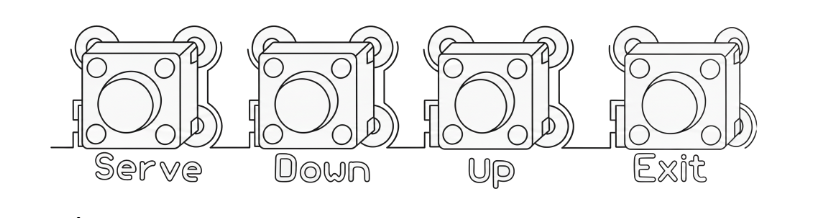
The Advanced Settings menu allows you to adjust game settings, run tests and restore factory defaults.
Accessing the Advanced Settings
The Advanced Settings buttons are located on the main PCB behind the back panel.
Turn the machine off.
Remove the two screws securing the back panel.
Open the back panel and locate the buttons at the bottom of the main PCB.
Button Functions
Serve – Enter the settings menu and confirm/select menu options.
Up – Move through menu options or increase values.
Down – Move through menu options or decrease values.
Exit – Leave a menu option or exit the settings menu.
After pressing Serve, the display will show P1, the first menu option.
Available Settings and Functions
A complete list of Advanced Settings codes and functions can be found in the Assembly & Instruction Manual included with your machine.
Please refer to article 5 – ADVANCED SETTINGS in the instructions manual for detailed information on each setting, including its purpose, default value, and available setting range.
A digital version of the user’s manual can be found at www.arcadro.com/manual